
Digital Gift Card Template & Formatting Requirements
Note for Developers & Integration PartnersIf you are fulfilling digital Gift Card orders directly by sending details to the recipient, your card presentation and layout must adhere to these requirements. To successfully pass certification, you must submit layout samples/renderings of each Gift Card to our team for formal marketing review and approval.
Overview & Required Elements
Every eGift Card delivered directly to recipients must incorporate the following core elements into its display layout:
- Gift Card Artwork / Image: Official image supplied per brand.
- Product Name: e.g., Everyday WISH eGift Card.
- Amount: Value of the Gift Card.
- Expiry Statement: A string detailing the eGift Card's expiration rules or validity period.
- Card Number Formats:
- In-Store Card Number: Display the last 13 digits of the Primary Account Number/Card number (PAN).
- Online Card Number: Display the full 19 digits of the PAN/Card number.
- Access Code: 4-digit PIN.
- Barcode: Dynamic barcode for physical scanner processing (See Barcode Specifications).
- Short-Form Terms & Conditions: Brand-specific legal copy (See Brand-Specific Requirements).
- Redemption Instructions & Restrictions: Clear steps for in-store and online usage, including category exclusions where applicable (See Brand-Specific Requirements).
Barcode Specifications
Barcodes must strictly adhere to the technical parameters below to ensure compatibility with in-store scanners (e.g., Datalogic GFS4400).
Technical Parameters
| Attribute | Specification Details |
|---|---|
| Barcode Type | CODE 128 Set B |
| Data Encoding Format | CARD NUMBER/PAN**PIN (Card number and Access Code separated by two asterisks). Example data string: 6280005550076555136**9482 |
| Length Constraints | Neither card number nor Access Code is length-restricted. |
| Quiet Zone | Minimum 5 mm white space frame around all sides of the barcode bars. |
| Colours | Black bars on a solid white background. |
| Human-Readable Text | Do NOT render text under the barcode. Human-readable numbers are displayed in separate fields to prevent scanner confusion. |
Sizing and Display Requirements
- Aspect Ratio: Length-to-height ratio of 3:1.
- Mobile Dimensions: Maximum 5.5 cm in length or 80% of phone screen width in portrait mode.
- Mobile Reference Render: 324 x 61px
- Desktop Reference Render: 633 x 119px
- Scanner Optical Density: Preferred element density between 0.254 mm and 0.508 mm (minimum readable density: 0.102 mm).
| Density - width of narrowest element [bar or space] in mm | Near field distance (min) | Far field distance (max) |
|---|---|---|
| 0.127 mm | 4.7 cm | 17.0 cm |
| 0.254 mm | 1.7 cm | 30.0 cm |
| 0.508 mm | 1.7 cm | 42.0 cm |
- Scan Failover: If a screen is too narrow to scan in portrait mode, prompt users to turn their device to landscape mode.
Brand-Specific Requirements
In addition to the standard template fields, each card brand requires card number displays, short-form Terms & Conditions, and redemption instructions.
Everyday Wish eGift Card
| Field | Value |
|---|---|
| Card Numbers to be displayed on Digital Gift Card | In-Store: Last 13 digits Online/Balance: Full 19 digits |
| Expiry Terms | This Gift Card does not expire. |
| Gift Card Redemption Instructions | Redeem an eGift Card in store. Select 'Gift Card & Other payment' as a payment method. Scan the barcode or enter the eGift Card number (also called in store code). Then enter 4 digit Access Code (also known as Passcode). You can find your eGift Card barcode, in-store number and Access Code on your email. Redeem an eGift Card online. Select Gift Card as a payment option. Enter the 19 digit card number, as well as the 4 digit Access Code. You can find your Online number and Access Code on your eGift Card email. |
| Short Form T&C's to be displayed on eGift Card delivered to recipient |
|
Woolworths Supermarket eGift Card
| Field | Value |
|---|---|
| Card Numbers to be displayed on Digital Gift Card | In-Store: Last 13 digits Online/Balance: Full 19 digits |
| Expiry Terms | This Gift Card does not expire. |
| Gift Card Redemption Instructions | Redeem an eGift Card in store. Select 'Gift Card & Other payment' as a payment method. Scan the barcode or enter the eGift Card number (also called in store code). Then enter 4 digit Access Code (also known as Passcode). You can find your eGift Card barcode, in-store number and Access Code on your email. Redeem an eGift Card online. Select Gift Card as a payment option. Enter the 19 digit card number, as well as the 4 digit Access Code. You can find your Online number and Access Code on your eGift Card email. |
| Short Form T&C's to be displayed on eGift Card delivered to recipient |
|
Essentials eGift Card
| Field | Value |
|---|---|
| Card Numbers to be displayed on Digital Gift Card | In-Store: Last 13 digits Online/Balance: Full 19 digits |
| Expiry Terms | This Gift Card does not expire. |
| Gift Card Redemption Instructions | Redeem an eGift Card in store. Select 'Gift Card & Other payment' as a payment method. Scan the barcode or enter the eGift Card number (also called in store code). Then enter 4 digit Access Code (also known as Passcode). You can find your eGift Card barcode, in-store number and Access Code on your email. Redeem an eGift Card online. Select Gift Card as a payment option. Enter the 19 digit card number, as well as the 4 digit Access Code. You can find your Online number and Access Code on your eGift Card email. |
| Short Form T&C's to be displayed on eGift Card delivered to recipient |
|
| Gift Card Redemption Restrictions | You cannot use your Essentials Card to purchase: a) Tobacco products; b) Liquor; c) Lotto / lottery products; d) Donations or charity products (such as merchandise); e) Home brew products; f) Gift cards and vouchers; or g) Motor oils and lubricants. |
BIG W eGift Card
| Field | Value |
|---|---|
| Card Numbers to be displayed on Digital Gift Card | In-Store: Last 13 digits Online/Balance: Full 19 digits |
| Expiry Terms | This Gift Card does not expire. |
| Gift Card Redemption Instructions | Redeem an eGift Card in store. Select 'Gift Card & Other payment' as a payment method. Scan the barcode or enter the eGift Card number (also called in store code). Then enter 4 digit Access Code (also known as Passcode). You can find your eGift Card barcode, in-store number and Access Code on your email. Redeem an eGift Card online. Select Gift Card as a payment option. Enter the 19 digit card number, as well as the 4 digit Access Code. You can find your Online number and Access Code on your eGift Card email. |
| Short Form T&C's to be displayed on eGift Card delivered to recipient |
|
Simply Groceries eGift Card
| Field | Value |
|---|---|
| Card Numbers to be displayed on Digital Gift Card | In-Store: Last 13 digits Online/Balance: Full 19 digits |
| Expiry Terms | This Gift Card does not expire. |
| Gift Card Redemption Instructions | Redeem an eGift Card in store. Select 'Gift Card & Other payment' as a payment method. Scan the barcode or enter the eGift Card number (also called in store code). Then enter 4 digit Access Code (also known as Passcode). You can find your eGift Card barcode, in-store number and Access Code on your email. Redeem an eGift Card online. Select Gift Card as a payment option. Enter the 19 digit card number, as well as the 4 digit Access Code. You can find your Online number and Access Code on your eGift Card email. |
| Short Form T&C's to be displayed on eGift Card delivered to recipient |
|
| Gift Card Redemption Restrictions | You cannot use your Simply Groceries Gift Card to purchase: a) Tobacco products; b) Liquor; c) Lotto / lottery products; d) Donations or charity products (such as merchandise); e) Home brew products; f) Gift cards and vouchers; or g) Motor oils and lubricants. |
Dan Murphy’s eGift Card
| Field | Value |
|---|---|
| Card Numbers to be displayed on Digital Gift Card | In-Store: Last 13 digits Online/Balance: Full 19 digits |
| Expiry Terms | This Gift Card does not expire. |
| Gift Card Redemption Instructions | Redeem an eGift Card in store. Select 'Gift Card & Other payment' as a payment method. Scan the barcode or enter the eGift Card number (also called in store code). Then enter 4 digit Access Code (also known as Passcode). You can find your eGift Card barcode, in-store number and Access Code on your email. Redeem an eGift Card online. Select Gift Card as a payment option. Enter the 19 digit card number, as well as the 4 digit Access Code. You can find your Online number and Access Code on your eGift Card email. |
| Short Form T&C's to be displayed on eGift Card delivered to recipient |
|
BWS eGift Card
| Field | Value |
|---|---|
| Card Numbers to be displayed on Digital Gift Card | In-Store: Last 13 digits Online/Balance: Full 19 digits |
| Expiry Terms | This Gift Card does not expire. |
| Gift Card Redemption Instructions | Redeem an eGift Card in store. Select 'Gift Card & Other payment' as a payment method. Scan the barcode or enter the eGift Card number (also called in store code). Then enter 4 digit Access Code (also known as Passcode). You can find your eGift Card barcode, in-store number and Access Code on your email. Redeem an eGift Card online. Select Gift Card as a payment option. Enter the 19 digit card number, as well as the 4 digit Access Code. You can find your Online number and Access Code on your eGift Card email. |
| Short Form T&C's to be displayed on eGift Card delivered to recipient |
|
Assets
| Asset | URL |
|---|---|
| Gift Card images | Available via the Gifting Catalogue API |
| Sample digital eGift Card template | 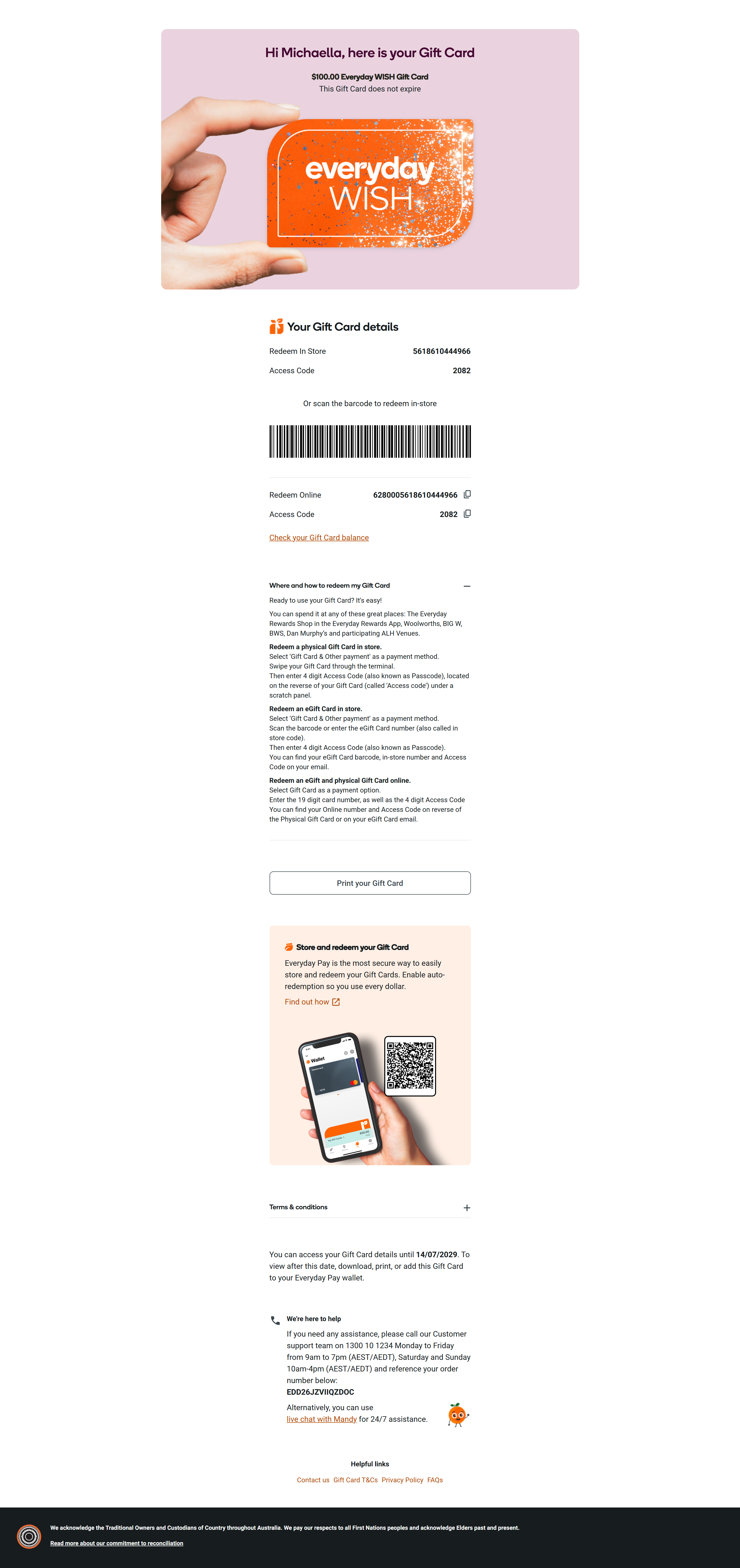 |
Updated 3 months ago