
JWT Authentication Process
Overview
JSON Web Token (JWT) is an open standard RFC 7519 that defines a compact and self-contained way for securely transmitting information between parties as a JSON object
This information can be verified and trusted because it is digitally signed via JSON Web Signature (JWS)
As a GaaS Client invoking Wpay APIs, you will have to provide the JWS (and metadata used to calculate it) in the headers of each HTTP request so that your API calls can be validated.
Client Requirements
You will be required to provide your Public Key, the associated Key ID and IPs to whitelist
In return, you will be provided with the apiClientId which you can embed as part of the JWT payload
Key Generation
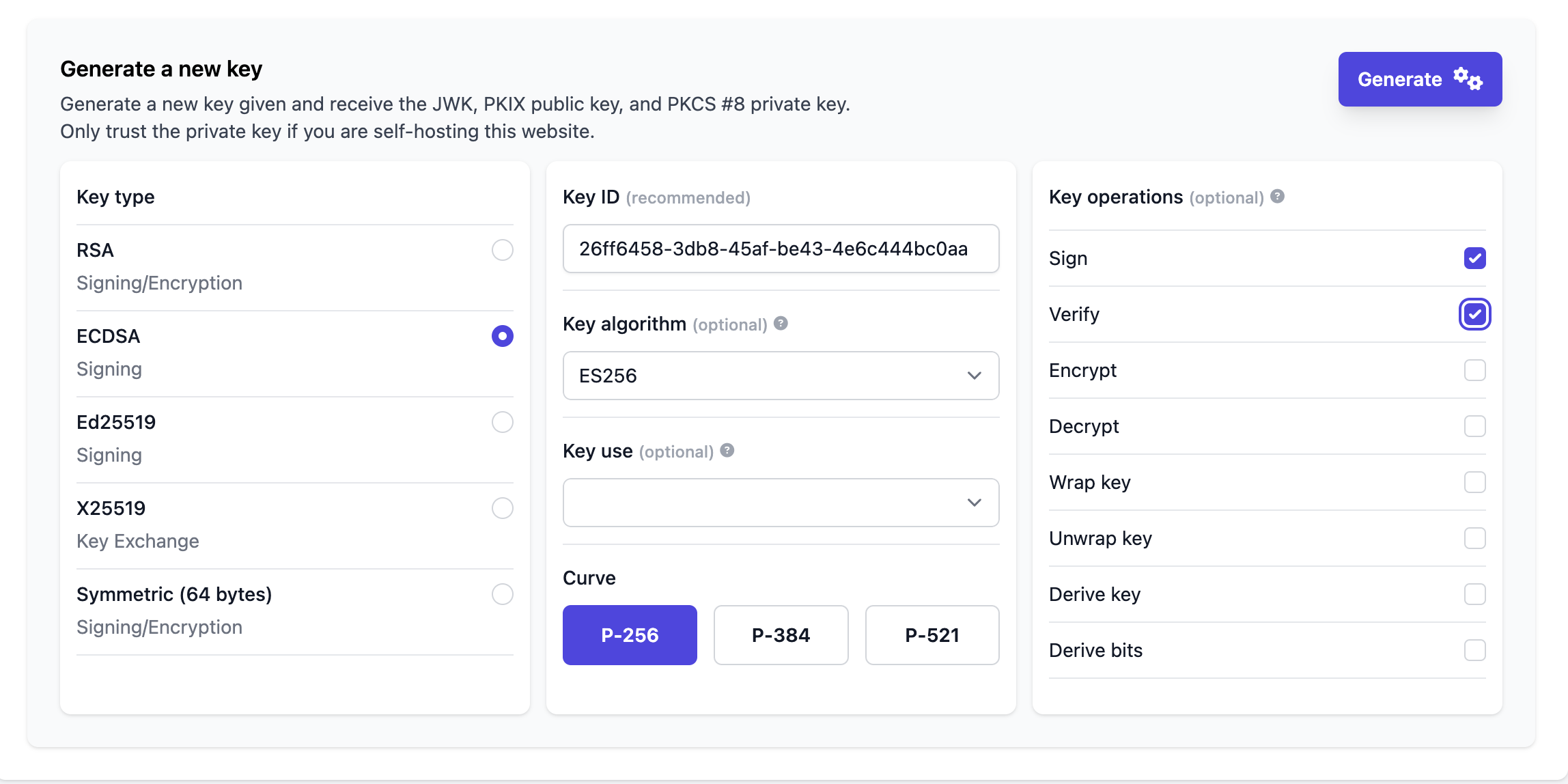
As a GaaS Client requiring API access, you will have to generate a private-public key pair using the ES256 algorithm
You can use either of the approaches listed below to generate your public-private key pairs
1. Command-Line
Private Key using OpenSSL
# Replace `private.ec.key` with anything you want.
openssl ecparam -name prime256v1 -genkey -noout -out private.ec.key

#Curve (prime256v1) maps to ES256 Algorithm for Keygeneration
Public Key using OpenSSL
# Be sure that `private.ec.key` is pointing to the correct private key path.

openssl ec -in private.ec.key -pubout -out public.pem
2. Online
Alternatively, you can also use Generate - JWK Set for Key generation.
JWT Header
The header contains metadata about the type of token and the cryptographic algorithms used to secure its contents.
| Field | Conditions | Description | Sample |
|---|---|---|---|
typ | REQUIRED | JWT | JWT |
alg | REQUIRED | Algorithm used to generate public private key pair currently only ES256 is supported | ES256 |
kid |
| Key id of the public key that will be used for signature verification The value must match to the one provided during the onboarding process. | ce9fa03a-76d3-4495-bda1-e841e726088f |
JWT Payload
| Field | Conditions | Description | Sample |
|---|---|---|---|
iat | REQUIRED | Token Issued At timestamp in epoch seconds | 1727322127 |
exp | REQUIRED | Token Expiration timestamp in epoch seconds | 1727342127 |
jti | OPTIONAL | A unique identifier (UUID) for the Token | BD1FF263-3D25-4593-A685-5EC1326E1F37 |
method | REQUIRED | The HTTP method (verb) of the API call:GETPOSTPUT | GET |
host | REQUIRED | The Host (domain) of the API call | capi.wpay.com.au |
path | REQUIRED | The Path of the API call. Protocol, host, and query parameters omitted. Full Path (BasePath + Endpoint) |
Ex: |
query | CONDITIONAL [if query parameters present]\: | The query parameters of the API call. Leading "?" omitted. | start_time=20240214100000&end_time=20240214103000 |
sha256 | CONDITIONAL [if request payload present] | A Base64 encoded SHA256 checksum (hash) of the complete API request payload. | 3CVbSqMg7VNDoDpf9/V07CAPf9srl1F/rcLG4YNEYF8= |
apiClientId | REQUIRED | The API consumer's Apigee API Key (GaaS Issued) | 5EC1326E1F37 |
Sample
JWT Header
{ "kid": "ce9fa03a-76d3-4495-bda1-e841e726088f", "typ": "JWT", "alg": "ES256" }JWT Payload-1
{
	"iat": 1727322127,
	"exp": 1727342127,
	"jti" : "BD1FF263-3D25-4593-A685-5EC1326E1F37",
	"method": "GET",
	"host": "capi.wpay.com.au",
	"path": "/gifting/gcc/client/api/v1/catalogue/programs",
	"query": "page=1&pageSize=10",
	"apiClientId": "<apigee_api_key>"
}
JWT Payload-2
{
	"iat": 1727322127,
	"exp": 1727342127,
	"jti" : "BD1FF263-3D25-4593-A685-5EC1326E1F37",
	"method": "POST",
	"host": "capi.wpay.com.au",
	"path": "/gifting/client/api/v1/catalogue/programs",
	"sha256": "EYeqMD3JIXXsiYNT3xaEKcbM7g71g80A6BrDAB/7HqY=",
	"apiClientId": "<apigee_api_key>"
}
API Request With JWT
The client signs the request by adding the following HTTP header for each Api Call they make to GaaS Services:
Authorization: Bearer <JWT-Token>Sample Request:
curl --location 'https://capi.wpay.com.au/gifting/gcc/client/api/v1/catalogue/programs' \
--header 'Authorization: Bearer <jwt-token> \
--header 'Content-Type: application/json' \
--header 'X-Correlation-Id: test-correlation-id
Error Messages
To avoid implementation detail leakage the client will receive a generic HTTP status code 401 or 403 error without a detailed explanation.
Integration Errors
The following are common error messages that one may encounter during integration with JWT in non-prod environments.
Invalid apiClientId
{
    "fault": {
        "faultstring": "Failed to resolve API Key variable request.header.x-api-key",
        "detail": {
            "errorcode": "steps.oauth.v2.FailedToResolveAPIKey"
        }
    }
}
Invalid kid
{
    "fault": {
        "faultstring": "Could not find a matching Public Key: policy(verify-jwt-token)",
        "detail": {
            "errorcode": "steps.jwt.NoMatchingPublicKey"
        }
    }
}
Invalid iat
{
    "fault": {
        "faultstring": "The Token is not yet valid: policy(verify-jwt-token)",
        "detail": {
            "errorcode": "steps.jwt.TokenNotYetValid"
        }
    }
}
Updated 6 months ago